Frame to Timeline
Frame to Timeline is a desktop app for macOS and Windows that writes frame-accurate camera cuts and fades into a Resolume Arena composition.
In a show where every song has its own visual clip and a live camera is mixed on top, the camera has to come in and out at exact moments: on a downbeat, on a cut in the visual, on a lyric. Doing that by hand on Arena’s tiny envelope editor is slow and never quite on the frame.
Frame to Timeline gives each song a proper editing timeline (visual thumbnails, the show audio waveform, beat grid and markers) and then writes the camera clip’s opacity envelope straight into the .avc file, aligned to the visual’s frames.
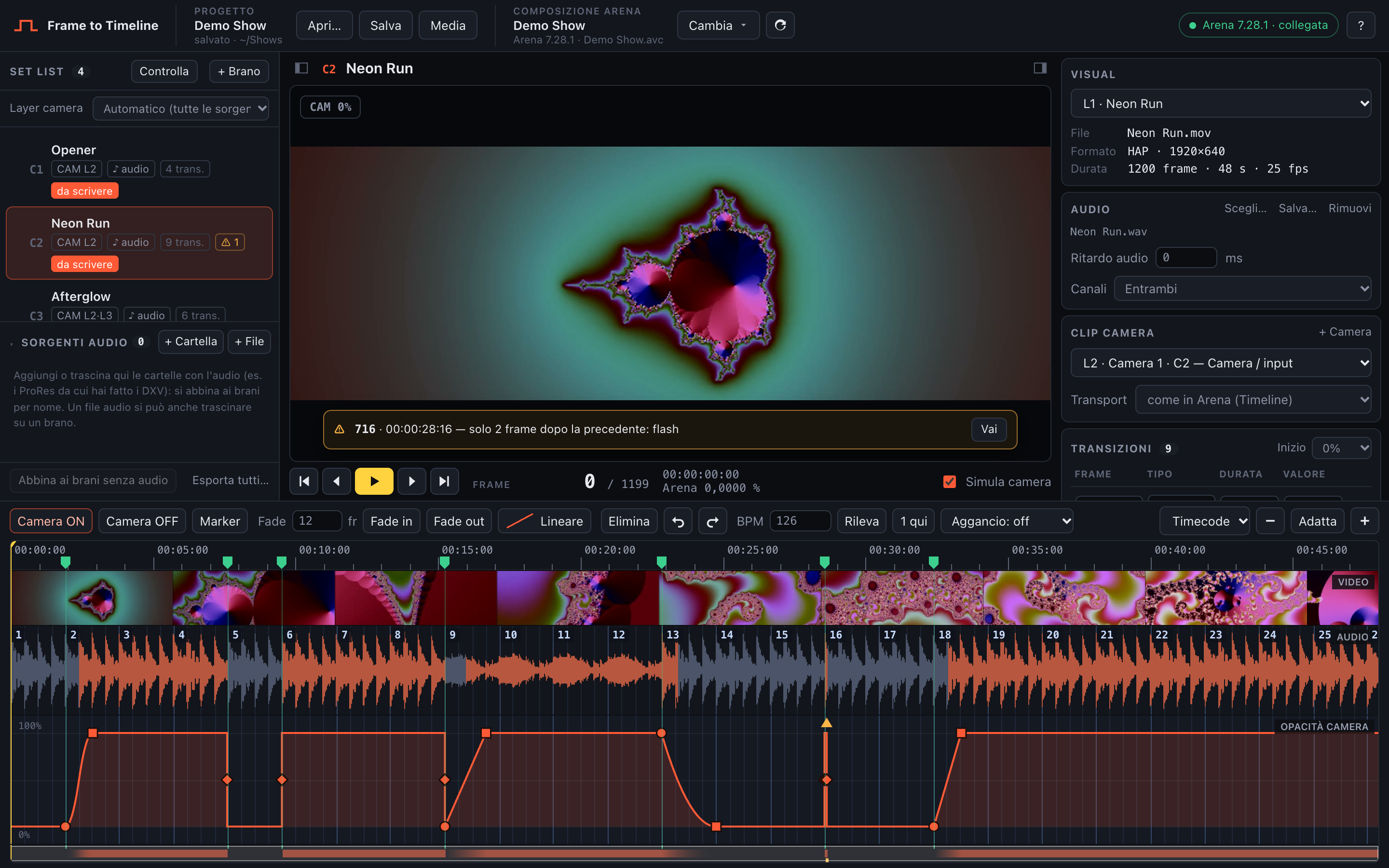
A song open in Frame to Timeline
What it does
Section titled “What it does”- Reads your Arena composition and turns every column with a visual into a song of the set list, paired with the camera clips of the same column (one envelope per camera).
- Plays the visual (DXV, HAP, ProRes, H.264…) in sync with the song’s audio, with a simulated camera overlay showing the opacity frame by frame.
- Lets you place cuts and fades (with curves) on the frame, snap them to the beat grid or to markers you tap in while listening.
- Writes everything to a copy of the composition (
… - FTT edit.avc). Your original file is never touched. - If Arena is open and connected, it saves Arena’s state into that copy, writes the keyframes and reopens the copy in Arena, then checks that Arena loaded what was written.
- Supports clips that run on their Timeline and clips locked to SMPTE timecode.
- Moves between computers: a project saved on Windows opens on a Mac (and back), and the media manager relinks the files that moved.
Requirements
Section titled “Requirements”- Resolume Arena 7 (tested with 7.28). The webserver must be enabled to work live with Arena; without it the app still writes the file.
- FFmpeg and FFprobe, used to read the videos and the audio, are included in the app: nothing to install.
- macOS or Windows.
How this guide is organised
Section titled “How this guide is organised”- Getting started: install, connect Arena, the welcome screen, fitting the window.
- Projects and set list: compositions, songs, audio, missing files and the media manager, saving.
- Editing the camera: the timeline, cuts, fades, curves, selections.
- Beat grid and markers: BPM, snapping, tapping markers.
- Playback and preview: playing, simulated camera, warnings.
- Writing to Arena: the write process, compensation, Timeline vs SMPTE timecode.
- Keyboard shortcuts.
- Troubleshooting.