Beat grid and markers
BPM and beat grid
Section titled “BPM and beat grid”Set the song’s tempo in the toolbar to show bars and beats on the timeline:
- type the BPM, or
- press Rileva (Detect) to estimate the tempo and the first downbeat from the audio.
Then place the playhead on a downbeat and press 1 qui (1 here) to align bar 1 with that frame. Bar numbers appear at the top of the waveform.
Alt + ← / → moves the playhead beat by beat.
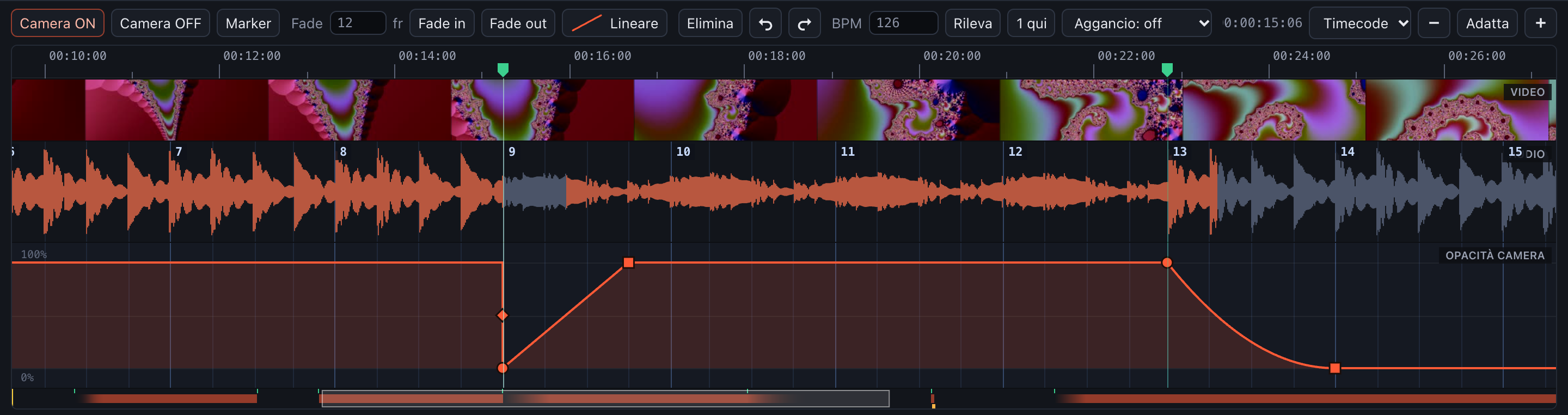
Bar numbers, beat lines and markers (green flags in the ruler)
Snapping
Section titled “Snapping”Aggancio (Snap) makes cuts and fades land on the grid: battuta (bar), beat, ½ beat or ¼ beat. S turns snapping on and off. While dragging, hold Alt to ignore the grid.
Markers
Section titled “Markers”Markers are the quickest way to follow the music by ear.
- Press
Mto drop a marker at the playhead, even during playback: play the song and tap along. - With playback stopped,
Mon an existing marker removes it. - Drag markers along the ruler to move them.
,and.jump to the previous / next marker.- Cuts and fades dragged near a marker stick to it.
Right-click a marker (or an empty area) for:
- Tagli su tutti i marker (Cuts on all markers): alternating ON/OFF cuts on every marker;
- Elimina il marker / Elimina tutti i marker (Delete the marker / all markers).
Markers are saved in the project and covered by undo.